
Filmage Screen - Screen Recorder1.1.5 - App Store
You'll be able to see results in few seconds.
Publisher Description
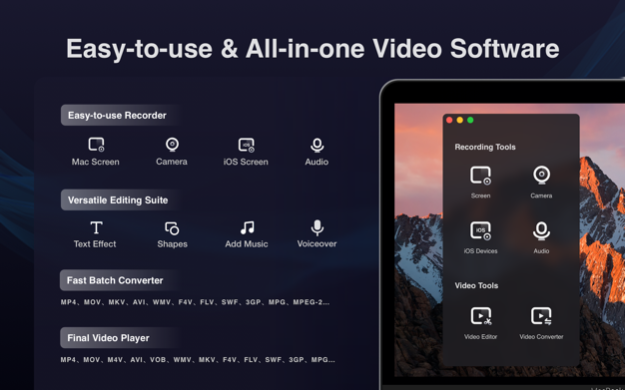
Filmage Screen, the all in one video software, integrates the best screen recorder, basic audio recorder, video editor, handy video converter and GIF maker, revolutionary to let you create wonderful videos.
Easy-to-use Video Recording
Record Mac / iPad / iPhone screen
Record a specified window even if it is covered
Picture in picture mode helps to create a video overlay that you place one video on top of another video
Record all your screen at full screen or at any size
Compress video with one click by choosing 1080P / 720P / 360P screen resolution before recording
Set different Frame Rates(15fps-60fps) for a smoother video
Record the audio with system build-in microphone, computer sound card or audio input device
Support to set cursor effect for a better presentation
Quickly export recorded video to MP4, animated GIF(GIF maker) and other formats
Unlimited recording time, Pause / resume recording
Professional Video Editing Suite
Trim and delete video clips
Professional video edit suite with voiceover and dynamic subtitle effect
Edit video with basic editing tools: texts, shapes, sketch, music
Drag videos, audios, images into video timeline and move them as you like
Incredible Video Converter
Convert any video file to MP4, MOV, AVI, MKV and other 30+
Batch convert multiple files to the same format or different simultaneously
Extract audio track from video file in high fidelity
Convert HD video without any quality loss
Customize the output folder to save output files
Comprehensible Media Player
Support play almost any video format: MP4, MOV, AVI, MKV, F4V, F4B and other 1000+ formats
Handle various 4K/1080P/720P HD videos for further editing
If you have questions, please email us to support@filmagepro.com
About Filmage Screen - Screen Recorder
This Video Tools program is available in English, ChineseSimplified, ChineseTraditional. It was last updated on 29 September, 2026. Filmage Screen - Screen Recorder is compatible with the following operating systems: Mac.
The company that develops Filmage Screen - Screen Recorder is Filmage Pro Team. The latest version released by its developer is 1.1.5.
The download we have available for Filmage Screen - Screen Recorder has a file size of 1.0 MB. Just click the green Download button above to start the downloading process. The program is listed on our website since 2020-09-03 and was downloaded 0 times. We have already checked if the download link is safe, however for your own protection we recommend that you scan the downloaded software with your antivirus. Your antivirus may detect the Filmage Screen - Screen Recorder as malware if the download link is broken.
How to install Filmage Screen - Screen Recorder on your Windows device:
- Click on the Download button on our website. This will start the download from the website of the developer.
- Once the Filmage Screen - Screen Recorder is downloaded click on it to start the setup process (assuming you are on a desktop computer).
- When the installation is finished you should be able to see and run the program.
Program Details
General
System requirements
Download information
Pricing
Version History
version 1.1.5
posted on 2020-09-03
The Best Screen Recorder software for Mac which has no recording time limits.
Schedule Recording supports to schedule a screen recording. It will start / stop recording automatically
Picture in Picture Mode and Cursor Effect supported
Disclaimer
Official App Store Link
We do not host Filmage Screen - Screen Recorder on our servers. We did not scan it for viruses, adware, spyware or other type of malware. This app is hosted by Apple and passed their terms and conditions to be listed there. We recommend caution when installing it.
The App Store link for Filmage Screen - Screen Recorder is provided to you by apps112.com without any warranties, representations or guarantees of any kind, so access it at your own risk.
If you have questions regarding this particular app contact the publisher directly. For questions about the functionalities of apps112.com contact us.
